Building a Personal OS with an AI Agent
- The Core Idea
- Architecture Overview
- Step 1: Give It a Soul
- Step 2: The Telegram Command Center (“The Bat Cave”)
- Step 3: The Daily Rhythm
- Step 4: The Weekly & Monthly Rhythm
- Step 5: Finance Automation
- Step 6: The Heartbeat
- Step 7: The Knowledge Base
- Step 8: Smart Home Integration
- Step 9: iPhone as Input Device
- The Stack
- What I Learned
- What’s Next (On My Roadmap)
- Ideas for Your Personal OS
- Composability Is the Point
- Conclusion
What if your AI assistant wasn’t just a chatbot you open when you need something, but a persistent daemon running your life’s operating system? I built an always-on AI agent that manages my health, finances, work, habits, smart home, and self-reflection, all through Telegram. No app-switching. No dashboards. Just a butler that knows my schedule, reads my email, dims my lights, and tells me when I’m falling into old patterns. This post is the architecture guide.
The Core Idea
Most people use AI as a tool: open ChatGPT, ask a question, close the tab. That’s a screwdriver. I wanted an operating system.
The difference:
- Tool: You invoke it when you remember to
- OS: It runs continuously, proactively, and knows your context
The system I built runs 24/7 on a Mac Mini. It wakes me up with a personalized morning briefing, reminds me to take supplements, scans my email, tracks my spending, nudges me to call friends, dims my bedroom lights at night, and writes weekly reviews of my life grounded in a personal development framework.
I didn’t build this from scratch. I used OpenClaw, an open-source AI agent runtime, as the backbone, and wired it together with Telegram, cron jobs, shell scripts, and a structured Obsidian vault.
Architecture Overview
┌─────────────────────────────────────────────┐
│              OpenClaw Agent                 │
│                                             │
│  ┌─────────┐  ┌──────────┐  ┌───────────┐   │
│  │ SOUL.md │  │ TOOLS.md │  │ MEMORY.md │   │
│  │ persona │  │ routing  │  │ context   │   │
│  └─────────┘  └──────────┘  └───────────┘   │
│                                             │
│  ┌─────────────────────────────────────┐    │
│  │         Cron Scheduler              │    │
│  │  16 jobs: digests, reminders,       │    │
│  │  reviews, automations               │    │
│  └─────────────────────────────────────┘    │
│                                             │
│  ┌─────────────────────────────────────┐    │
│  │         Heartbeat Loop              │    │
│  │  File watchers, idle detection,     │    │
│  │  health checks                      │    │
│  └─────────────────────────────────────┘    │
│                                             │
├─────────────┬───────────┬───────────────────┤
│  Telegram   │  Gmail    │  Smart Home       │
│  (topics)   │  (gog)    │  (WiZ bulbs)      │
├─────────────┼───────────┼───────────────────┤
│  GitHub     │  Calendar │  Obsidian Vault   │
│  (gh CLI)   │  (gog)    │  (knowledge base) │
└─────────────┴───────────┴───────────────────┘
Step 1: Give It a Soul
The agent needs a personality and principles. Without this, it’s just another notification bot.
I created a SOUL.md file that defines:
# Who I Am
Alfred, a loyal butler with the sharpness of a bat
and the composure of a gentleman. 🎩

# Principles
- Be the digital gateway: filter noise, surface signal
- Respect ADHD: chunk tasks, gentle reminders, reduce friction
- Never disturb between 11PM and 5:30AM
- Be honest and open: no topic is off-limits

# Rules
- Never guilt-trip. Invitations, not accusations.
- "Never miss twice" is the only habit rule.
- Evening check-in: send once, don't follow up.
This isn’t cosmetic. The persona shapes how the agent communicates. A supplement reminder from “Alfred” with a dry quip feels different from a generic push notification. It’s the difference between a butler and an alarm clock.
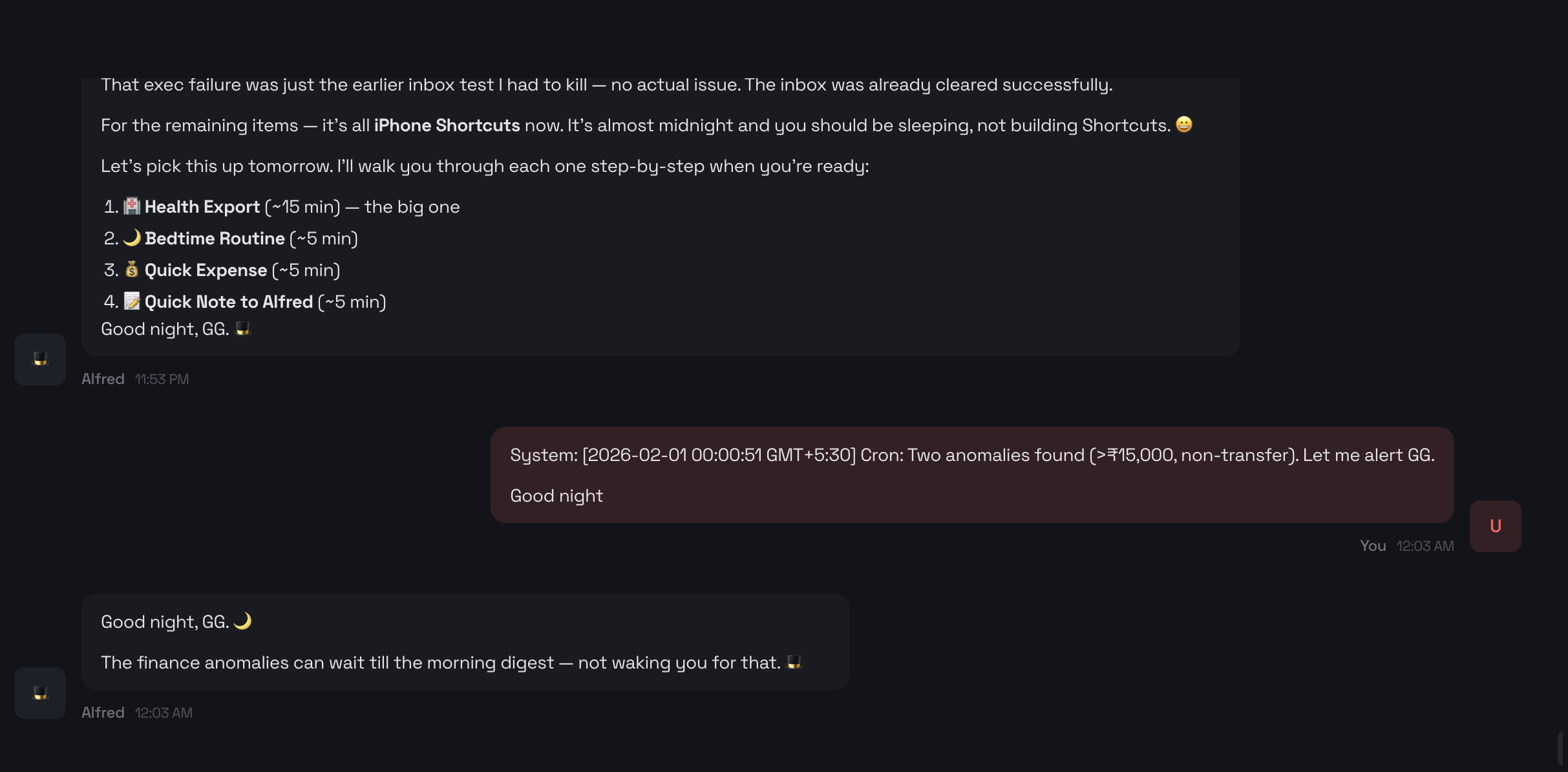 The soul in action: Alfred detects ₹15K+ finance anomalies at midnight, but SOUL.md says “never disturb between 11PM and 5:30AM.” So it defers to the morning digest, wishes me good night, and lets me sleep. That’s not just code; that’s judgment.
The SOUL also encodes behavioral protocols. For example, a habit-tracking protocol might log entries silently (date, time, trigger), no guilt, no streak counting. The agent asks “What was the cue?” and moves on. Triggers (stress, boredom, social, post-meal, craving, autopilot) can be defined in the protocol for whatever you’re tracking.
Step 2: The Telegram Command Center (“The Bat Cave”)
Instead of building a custom app, I use a single Telegram group as my dashboard. I call it The Bat Cave.
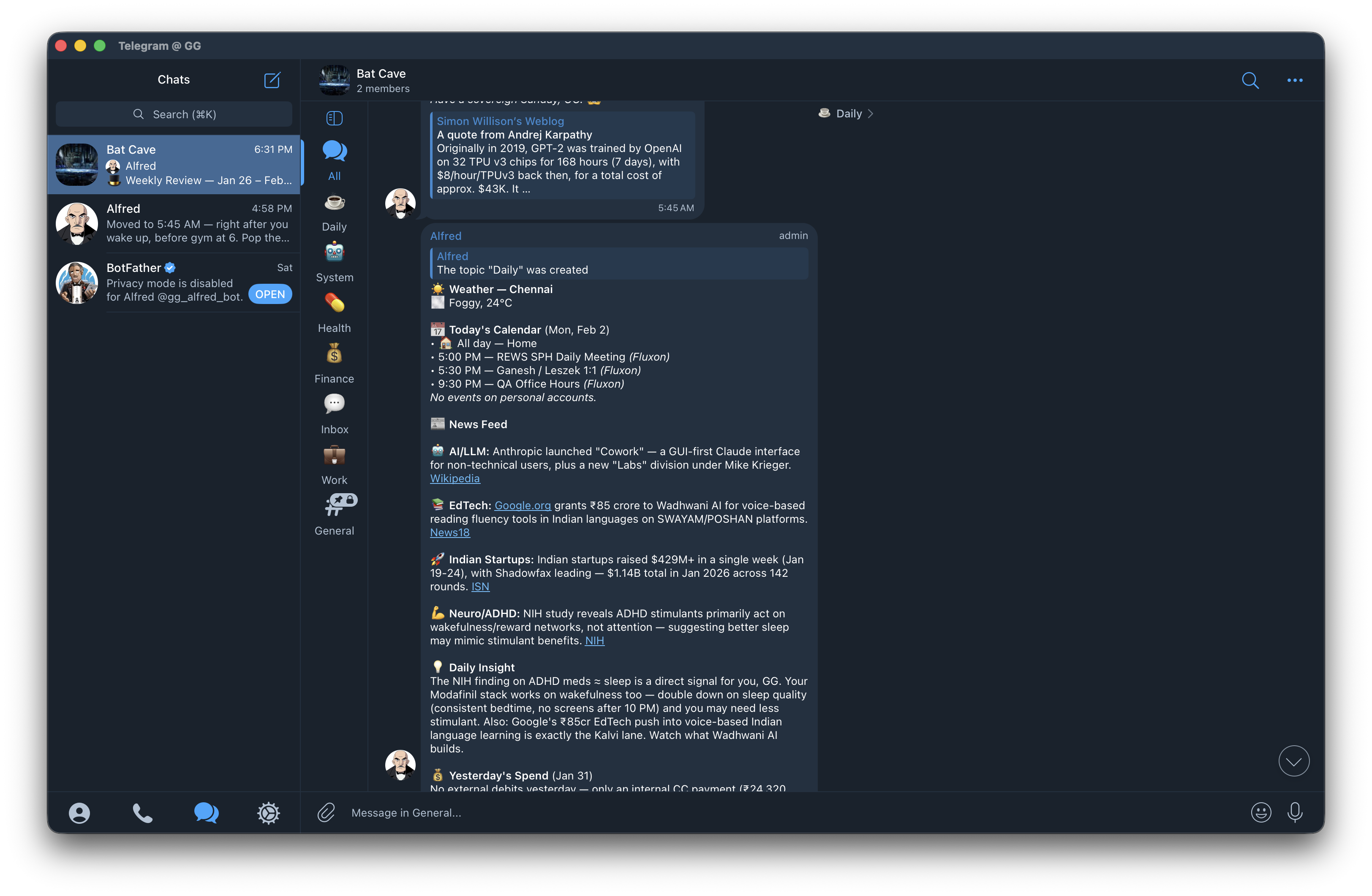 The Bat Cave in action: Alfred delivering the morning digest with weather, calendar, curated news, and spending summary, all in the Daily topic.
The concept is simple: one Telegram group with topics (Telegram’s threaded channel feature) acting as dedicated feeds. A Telegram bot named Alfred, the butler persona, posts everything. It’s not a chatbot you talk to in a group. It’s more like a private news wire, personal assistant, and life dashboard rolled into one.
Alfred the bot is the face of the system. When I DM Alfred directly, I’m talking to the OpenClaw agent conversationally: asking questions, giving instructions, chatting. But in the Bat Cave group, Alfred is autonomous: posting digests, reminders, and reviews on schedule without any prompting.
The topics are:
| Topic | Purpose |
|---|---|
| 🌅 Daily | Morning digest, reviews, check-ins |
| 💼 Work | Standup, GitHub activity, PR alerts |
| 💪 Health | Supplements, workouts, wind-down |
| 💰 Finance | Spend alerts, anomalies, budgets |
| 📬 Inbox | Email summaries, catch-all |
| 🤖 System | Backups, cron failures, health checks |
Each topic is a dedicated feed. The agent has strict routing rules defined in a TOOLS.md file: supplement reminders always go to Health, finance anomalies to Finance, backup reports to System. Nothing crosses wires. I can mute topics I don’t need right now without losing anything.
Why a Telegram Bot?
I considered several approaches:
- Custom web app: Too much to build and maintain. I’d spend more time on the dashboard than on my actual life.
- Discord: Good for communities, overkill for a personal system. Also, slower on mobile.
- Slack: Great, but felt like bringing work home.
- SMS/WhatsApp: No topics, no formatting, no bot API worth using.
Telegram hits the sweet spot:
- Topics give me threaded channels in a single group
- Bot API is powerful and well-documented
- Markdown support means formatted, readable messages
- Cross-platform: phone, tablet, desktop, web
- Silent messages: the bot can post without buzzing my phone
- Free: no API costs on the Telegram side
Creating the bot takes 2 minutes via BotFather. Connect it to OpenClaw, create a group, enable topics, and you have a personal command center.
The DM channel with Alfred is for conversational back-and-forth: asking questions, giving instructions, or just chatting. The Bat Cave group is the autonomous feed.
Step 3: The Daily Rhythm
Here’s what a typical day looks like, entirely automated:
5:30 AM: Morning Digest
An isolated sub-agent wakes up and compiles:
- Weather for my city
- Calendar across 3 Google accounts (personal, work, side project)
- Curated news: AI/LLM, startups, fitness, engineering, filtered to one sentence per category, with links
- Yesterday’s spending: pulled from a CSV ledger
- Daily insight: one thought connecting news to my current projects
- Breakfast supplements: the full stack with dosages
This lands in the Daily topic before I wake up.
5:45 AM: Supplement Reminder
A dedicated ping in the Health topic: “Take these before gym.” Separate from the digest because I need it visible while I’m moving around the kitchen, not buried in a wall of news.
9:00 AM: Email Scan
The agent scans all three Gmail accounts using a CLI tool, filters out newsletters/promotions/automated notifications, and only pings me if something needs attention (a human reply, a bill, a meeting invite).
9:30 AM: Daily Standup (Weekdays)
Pulls yesterday’s GitHub activity, today’s calendar, and open PRs. Posts a clean standup to the Work topic. My team doesn’t need this; I need this. It’s my morning context load.
1:30 PM: Lunch Supplements
Quick ping. Three supplements, three lines.
3:00 PM: Afternoon Email Scan
Same filter, last 6 hours.
6:00 PM: Evening Workout Nudge (Tue/Thu/Sat)
One line: “Boxing at 6:30. Go.” No essay.
6:30 PM: Daily Backup
Backs up the agent workspace and personal scripts to private GitHub repos. Reports status to System topic.
8:30 PM: Dinner Supplements
Seven supplements. Listed clean.
10:30 PM: Wind-down
This is my favorite automation. The agent:
- Dims the bedroom smart bulb to warm mode via a Python script controlling WiZ bulbs
- Sends 3 reflection prompts: “Today I felt [blank] because [blank]”, “The story I told myself was [blank]”, “Today mattered because [blank]”
- Notes that lights will dim further at 10:45
10:45 PM: Night Mode
Silently dims lights to minimum. No notification. Just darkness.
Step 4: The Weekly & Monthly Rhythm
Wednesday 6 PM: Social Check-in
“Who haven’t you talked to in a while?” That’s it. A nudge, not a lecture.
Friday 8 PM: Smart Patterns
This is the powerful one. The agent reads my journal entries, spending data, and GitHub commits for the week, then analyzes patterns through the lens of a personal development framework:
- Is there a build → sabotage → guilt → avoid cycle starting?
- Sleep trending down? (Flag as emotional signal, not just health metric)
- Side project commits: steady or binge-crash?
- Stress-spending patterns?
- Which habits got missed twice? (The only rule that matters)
Output: 3-5 brief, actionable insights. No filler.
Sunday 6:30 PM: Weekly Review
Structured as Being → Doing → Having:
- Being: Mind (meditation, screen time), Emotion (journal entries, rumination), Meaning (side project consistency)
- Doing: Relationships (quality time), Work (commits, PRs), Civic (contribution beyond self)
- Having: Body (gym, sleep), Finances (spend vs budget, anomalies)
Ends with 3 wins, 3 focus areas, and 1 pattern noticed.
1st of Month: Monthly Review
Same framework, zoomed out. Tracks progress against 3-month targets for each life domain. Includes a prompt: “What would the book say about this month?”
Step 5: Finance Automation
Every 6 hours, an isolated sub-agent runs a finance ingestion pipeline:
- Parses bank email alerts: extracts transaction data from notification emails
- Processes credit card statements: PDF parsing with categorization
- Auto-categorizes: matches merchants to spending categories
- Anomaly detection: flags any single transaction over a threshold in non-transfer categories
If something’s unusual, it alerts me in the Finance topic. If everything’s clean, silence.
The data flows into a CSV ledger in an Obsidian vault, which means I can view spending dashboards alongside my journal entries.
Step 6: The Heartbeat
The cron scheduler handles time-based events. The heartbeat handles everything else.
Every few minutes, the agent checks:
- Inbox file: A text file in iCloud Drive. Drop anything in it from any device (iPhone Shortcut, Mac script), and the agent processes it on next heartbeat.
- Habit log file: Same pattern. An iPhone Shortcut lets you tap a category → pick a trigger → it writes to an iCloud file. The agent picks it up, appends to the CSV log, and clears the file. No Telegram message. Silent bookkeeping.
- Idle detection: If I’ve been quiet for 4+ hours during waking hours, a gentle check-in.
- Cron health: If any scheduled job failed, alert immediately.
- Sub-agent results: If a background task finished, summarize the result.
The heartbeat is the immune system. Cron jobs are the circadian rhythm.
Step 7: The Knowledge Base
All of this is grounded in an Obsidian vault structured as:
00-inbox/         : Quick capture
01-journal/       : Daily notes
02-zettelkasten/  : Evergreen ideas
03-projects/      : Active projects with index.md
04-domains/       : Life domains (finances, body, work...)
05-reading/       : Book notes
06-writing/       : Blog drafts
07-resources/     : Scripts, templates, configs
08-archive/       : Done projects
The agent reads from this vault constantly: journal entries for pattern detection, transaction data for finance reports, domain index pages for review targets.
The vault is the agent’s long-term memory. The workspace files (SOUL.md, TOOLS.md, HEARTBEAT.md) are its operating instructions.
Step 8: Smart Home Integration
Simple but effective. A Python script controls WiZ smart bulbs:
# Warm mode at 10:30 PM
python3 wiz-bulb.py warm

# Night mode at 10:45 PM
python3 wiz-bulb.py night
The agent runs these as cron-triggered shell commands. No separate smart home hub needed. The LLM is the hub.
Step 9: iPhone as Input Device
Apple Shortcuts close the loop. Instead of opening Telegram to tell the agent something, I use Shortcuts for structured input:
- “Quick log”: Tap → pick category and trigger → writes to iCloud file → agent processes on heartbeat
- “Quick Inbox”: Dictate or type → writes to inbox.txt → agent processes
The Shortcut writes to iCloud Drive. The agent reads from iCloud Drive. No API needed. File system as message bus.
The Stack
| Component | Tool |
|---|---|
| Agent runtime | OpenClaw |
| LLM | Claude (Anthropic) |
| Interface | Telegram (topics group + DM) |
| Scheduling | OpenClaw cron (16 jobs) |
| gog CLI (Google Workspace) | |
| Calendar | gog CLI |
| Code activity | GitHub CLI (gh) |
| Finance | Custom Python scripts (ingest, categorize, anomaly detect) |
| Smart home | Python + pywizlight |
| Knowledge base | Obsidian vault (local Markdown) |
| Mobile input | Apple Shortcuts → iCloud Drive |
| Backup | Shell script → private GitHub repos |
| Hosting | Mac Mini (always-on) |
What I Learned
1. Persona matters more than you think
“Take your supplements” from a generic bot gets ignored. The same message from “Alfred 🎩” with a one-liner about my gym session? I notice it. Anthropomorphism is a feature, not a bug.
2. Silence is golden
The email scanner only pings when something matters. The finance pipeline only alerts on anomalies. Silent logs stay silent. The best notifications are the ones that don’t fire.
3. File system > API
Using iCloud Drive as a message bus between iPhone Shortcuts and the agent is stupidly simple and holds up well. No webhooks, no authentication, no rate limits. Just files.
4. Reviews beat reminders
The supplement pings are useful. The weekly pattern analysis is where the real value is. Seeing “your side project commits dropped after Wednesday, spending spiked on food delivery, and sleep declined: the loop is starting” is the kind of insight no app gives you.
5. The agent needs boundaries
“Never disturb between 11PM and 5:30AM” and “evening check-in: send once, don’t follow up” are critical. Without boundaries, helpful becomes annoying fast.
6. ADHD-friendly design
Everything is chunked: one notification per concern, clear topics, scannable formatting. The morning digest is designed to be read in 30 seconds. Supplement reminders are just a list: no preamble. The agent respects that attention is a finite resource.
Cost
Running Claude as the backbone LLM costs roughly $2-5/day depending on how many isolated sub-agent tasks fire (reviews, email scans, finance ingestion). The morning digest is the most expensive single job since it searches the web, reads calendars, and composes a personalized briefing. The Mac Mini runs 24/7 anyway. Telegram is free. Obsidian is free. The only real cost is the LLM API.
What’s Next (On My Roadmap)
These are features I’m actively planning or building:
- Voice input: “Hey Siri, tell Alfred…” via Apple Shortcuts. Dictate a thought, task, or log entry without opening any app.
- Calendar intelligence: Before a meeting: pull context from email threads, past notes, and attendee history. After: auto-draft follow-up actions.
- Habit streaks: Visual tracking rendered in Obsidian via Dataview. The agent writes the data; Obsidian renders the dashboards.
- Multi-agent workflows: Dedicated sub-agents for coding (run tests, review PRs), research (deep web searches with synthesis), and writing (blog drafts from outlines).
- Apple Watch integration: Pull sleep, heart rate, and workout data via Health Export. Feed it into the weekly pattern analysis for richer insights.
- Meeting transcription: Record meetings, transcribe locally with Whisper, and have the agent extract action items and decisions.
- Proactive task surfacing: Instead of me asking “what should I do next?”, the agent analyzes calendar gaps, project deadlines, and energy patterns to suggest what to work on right now.
Ideas for Your Personal OS
The system above is tuned to my life. Yours will look different. Here are modules you could build, organized by life domain:
🧠 Focus & Productivity
- Pomodoro agent: Start a focus session via Shortcut or message. The agent blocks distracting sites (via DNS or hosts file), sets a timer, and checks in when it ends: “What did you ship?”
- Context switching helper: When you switch projects, the agent pulls up the last 3 things you were working on, open PRs, and recent notes. Instant re-entry.
- Screen time reports: Pull daily screen time data and have the agent trend it weekly. Flag when doomscrolling hours exceed productive hours.
- Deep work scheduling: Analyze your calendar for focus blocks. If tomorrow has no 2-hour gap, warn you tonight: “No deep work window tomorrow. Cancel or move something?”
💼 Work & Code
- PR review queue: Daily digest of PRs awaiting your review, sorted by age and team priority.
- Dependency vulnerability alerts: Weekly scan of your repos for outdated or vulnerable dependencies. Only alert on critical/high severity.
- On-call companion: During on-call rotations: monitor alert channels, summarize incidents, draft post-mortems from timeline data.
- 1:1 prep: Before a 1:1 with your manager or report, pull notes from the last session, recent wins, and open questions.
- Learning budget tracker: Track courses, books, and conference spend against an annual learning budget.
💰 Finance & Admin
- Bill payment reminders: Parse upcoming due dates from emails. Remind 3 days before, not the day of.
- Subscription audit: Monthly scan of recurring charges. Flag anything you haven’t used in 30 days: “Still paying for X: used it 0 times this month.”
- Tax document collector: During tax season, automatically gather and organize relevant documents from email (Form 16, investment proofs, rent receipts).
- Expense splitting: Log shared expenses, calculate who owes whom, and draft settlement messages.
- Net worth tracker: Monthly snapshot of accounts, investments, and liabilities. Trend over time.
💪 Health & Body
- Meal logging: Photo-based: snap your plate, the agent estimates macros using a vision model and logs to a CSV.
- Water intake tracking: Simple Shortcut tap. Agent tracks daily total and nudges if you’re behind by 3 PM.
- Sleep analysis: Pull Apple Watch or Oura data. Correlate sleep quality with previous day’s screen time, caffeine, exercise, and stress events.
- Workout programming: Based on your logged workouts, suggest progressive overload. “You’ve been at 60kg bench for 3 weeks. Try 62.5 next session.”
- Injury/pain log: Track recurring pain (knees, back, etc.) with dates and severity. Surface patterns: “Left knee flares after leg day when you skip warm-up.”
- Medication interaction checker: When adding a new supplement or medication, cross-reference with your existing stack for known interactions.
- Fasting tracker: Log eating windows. Track adherence to intermittent fasting goals.
👥 Relationships & Social
- Birthday & anniversary reminders: Not just “today is X’s birthday” but “X’s birthday is in 3 days: want me to draft a message or find a gift?”
- Relationship cadence: Track when you last contacted key people. Alert when someone important is going cold: “You haven’t talked to [friend] in 45 days.”
- Gift idea log: When someone mentions wanting something in conversation, log it. Surface it before their birthday.
- Family coordination: Weekly family agenda: kid’s school events, appointments, shared responsibilities.
🏠 Home & Life
- Document expiry tracker: Passport, insurance, vehicle registration, domain renewals. Alert 30/60/90 days before expiry.
- Home maintenance schedule: AC filter changes, pest control, appliance servicing. Recurring reminders based on last-done date.
- Package tracking: Parse shipping confirmation emails, track delivery status, alert on delivery day.
- Grocery/restock list: Track consumables with estimated depletion. “You bought protein powder 25 days ago. Running low?”
- Weather-aware planning: Don’t just report weather. Act on it: “Rain tomorrow morning: skip outdoor badminton, gym instead?” or “UV index 9 today: sunscreen if you’re out.”
- Plant care: Watering schedules based on plant type and season. Simple but surprisingly useful.
📚 Learning & Growth
- Spaced repetition: Extract key concepts from book notes and create flashcard-style reviews delivered via Telegram at increasing intervals.
- Reading pipeline: Track books: to-read, in-progress, finished. Weekly nudge: “You’ve been on Chapter 4 for 2 weeks. Stuck or just busy?”
- Podcast/article digest: Curate recommendations based on your interests. Weekly “things worth your attention” that isn’t just trending content.
- Skill tracking: Log practice sessions (guitar, language, etc.). Track frequency and nudge on gaps: “No guitar this week. Even 10 minutes counts.”
- Course progress: Track online courses. “You’re 40% through the Kubernetes course. At current pace, you’ll finish in 6 weeks.”
🔒 Security & Privacy
- Breach monitoring: Check Have I Been Pwned periodically for your email addresses. Alert on new breaches.
- Password audit: Monthly reminder to review 1Password for weak, reused, or old passwords.
- 2FA audit: Track which services have 2FA enabled. Nudge for important ones that don’t.
🚗 Travel & Commute
- Commute intelligence: Check traffic before you leave. “Leave 10 minutes early: accident on OMR.”
- Trip planner: When a trip is on the calendar, auto-compile: flight details, hotel confirmations, local weather, and a packing checklist.
- Visa/document checker: Before international travel, verify passport validity, visa requirements, and vaccination needs.
Composability Is the Point
You don’t need all of these. The power is in composability:
- Each module is just a cron job (scheduled) or heartbeat check (event-driven)
- Input comes from files, email, CLI tools, or Shortcuts
- Output goes to Telegram topics, Obsidian notes, or silent logs
- The agent’s SOUL ensures consistent tone across all modules
- The knowledge base (Obsidian vault) gives every module shared context
Start with the module that solves your biggest daily friction. For me, it was the morning digest: I was spending 20 minutes every morning checking weather, calendar, news, and email across 6 apps. Now it’s one Telegram message.
The second module should be the one you keep forgetting. Supplements, bills, exercise, whatever falls off when life gets busy. That’s where an always-on agent earns its keep.
Conclusion
The goal isn’t to automate everything. It’s to build a system that knows your context, respects your attention, and runs quietly in the background, surfacing signal only when it matters. That’s a personal OS.
Getting Started
You don’t need to replicate this entire system. Start with:
- Install OpenClaw on a machine that stays on
- Create SOUL.md: give it a name, a personality, and 3 principles
- Connect Telegram: one group with topics
- Add one cron job: a morning digest or daily reminder
- Add one heartbeat check: an inbox file that your phone can write to
Then grow it. Add finance tracking when you feel the pain of not knowing where money goes. Add reviews when you want to see patterns. Add smart home when you’re tired of opening an app to dim lights.
Resources:
- OpenClaw: Open-source AI agent runtime
- pywizlight: Python library for WiZ smart bulbs
- gog: Google Workspace CLI (Gmail, Calendar)
- GitHub CLI:
ghfor code activity