Driving Coding Agents from Chat
- Why this model works
- Remote coding, not just chat commands
- In action
- Setup
- How coding agents plug into OpenClaw
- The command convention (small and predictable)
- Text and voice command language
- Operator loop (the practical one)
- What to expect in real usage
- Pros and cons of coding through messaging
- What “proper agentic setup” means
- Text vs voice interface
- Multi-agent coordination (without chaos)
- Session hygiene rules
- Final take
- Further reading
Most coding-agent workflows assume you’re at a terminal.
I wanted the opposite: operate coding agents from messaging, with OpenClaw as the control layer, while keeping the workflow reliable enough for real engineering.
This post is the exact setup and command protocol I use locally.
Why this model works
You keep one operator interface (chat), and swap execution agents as needed:
- Codex for implementation speed
- Claude for planning and structured reasoning
- Gemini for alternate review perspective
You don’t change your command style. Only the agent prefix changes.
Remote coding, not just chat commands
The practical shift here is remote operation.
- You can start, monitor, and steer coding runs from your phone.
- You can handle triage and review loops through text or voice.
- You can continue work while away from terminal access, as long as control paths stay explicit.
This is why command discipline matters: remote workflows need clear status, cancel, reset, and recovery behavior.
Where this is most useful
- During commute windows:
next,status,review - Between meetings: assign a scoped implementation step
- After merges: run a quick follow-up check cycle without opening a full dev environment
In action
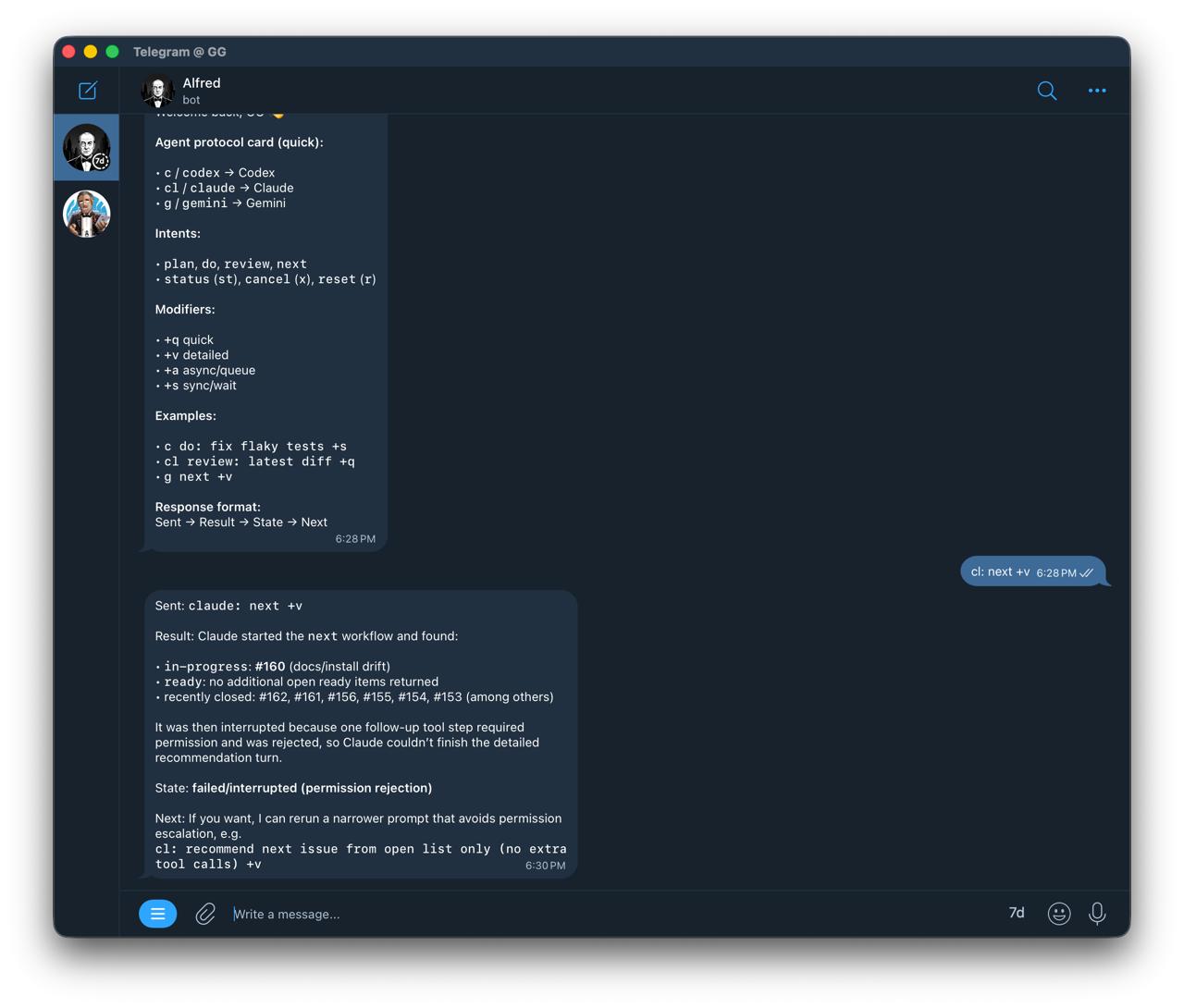
From chat, I can ask for:
codex: <task>claude: <task>gemini: <task>
And control state with:
<agent> status<agent> cancel<agent> reset<agent> next
Setup
This setup uses a local OpenClaw installation, ACP support, and a connected messaging channel.
How coding agents plug into OpenClaw
A concise integration view:
- OpenClaw handles orchestration (chat interface, routing, and lifecycle control).
- ACP runtime is the execution path for harness-style coding agents.
- In this local setup, ACPX is the bridge used to run and persist sessions for agents such as Codex and Claude.
- Chat surfaces differ in thread/session behavior, so it helps to keep a deterministic session naming fallback.
This split keeps command usage stable while execution backends can vary.
1) Install and onboard
curl -fsSL https://openclaw.ai/install.sh | bash
openclaw onboard --install-daemon
2) Verify runtime
openclaw gateway status
openclaw status
openclaw doctor
3) Configure model auth
openclaw models auth add
openclaw models status
4) Secure messaging access
openclaw pairing list
openclaw pairing approve
This is enough to start driving agents from chat.
The command convention (small and predictable)
I use a strict message protocol:
codex: <task>claude: <task>gemini: <task>
Control verbs:
<agent> status<agent> cancel<agent> reset
Optional intent tags:
<agent> plan: ...<agent> do: ...<agent> review: ...
This keeps orchestration simple and avoids prompt drift.
Operator protocol card
Use this as a compact, muscle-memory layer:
c:→ Codexcl:→ Claudeg:→ Geminist→ statusx→ cancelr→ resetn→ next
Example:
c n +v
cl review +q
g st
(Translate shorthand to full commands if you share the setup with others.)
Text and voice command language
This follows the same principle as my personal command language system: typing and voice have different constraints.
Text mode (brevity wins)
- Short prefixes
- Fast control verbs
- Minimal keystrokes
Voice mode (clarity wins)
- Longer, explicit phrases
- Better recognition reliability
- Fewer accidental triggers
Examples:
- Text:
c: next with details - Voice: “Codex, show next task with details”
Rule of thumb: voice for orchestration, text for precision.
Useful modifiers
+qquick output+vdetailed output+aasync/queue+ssync/wait!elevated/unsafe mode for that command
! usage examples:
c! do: <task>cl! review: <scope>g! next +v
Default mode (without !) stays guarded.
Example:
c: next +v
cl: review latest diff +q
Operator loop (the practical one)
For each command, return in this format:
- Sent — what was routed to the agent
- Result — concise output (or key excerpt)
- State — queued/running/done
- Next — suggested follow-up
This format keeps updates consistent and easy to track.
What to expect in real usage
Good path
- You send
claude: next with details - Agent checks issues/context
- You get one recommendation + rationale
Failure path
Sometimes agent-side network/permission context differs from host context.
Example symptom: an agent can run gh commands syntactically but fails reaching api.github.com in its execution context, while host gh works.
When that happens:
- verify host health (
openclaw status) - verify
gh auth status - retry agent task once
- if still blocked, fetch data from host and pass it to the agent as input
The key is to treat this as an execution-context issue, not a prompt issue.
Failure playbook (fast recovery)
status→ confirm current run statecancel→ stop stuck/ambiguous runs- Retry once with narrower scope
- Validate host-side dependencies (
gh auth status, connectivity) - If agent context is blocked, inject host-fetched data and continue
This keeps momentum without silently losing control.
Pros and cons of coding through messaging
Pros
- You can operate from anywhere (phone-first, not desk-bound)
- One interface can route across Codex, Claude, Gemini, and others
- Lower context-switch cost for triage, planning, and review loops
- Status/cancel/reset controls make long-running tasks operationally manageable
- Works naturally with text and can be extended to voice commands
Cons
- Agent execution context can differ from host context (network/permissions)
- Long tasks require stricter session hygiene than terminal-only workflows
- Ambiguous prompts are more expensive in chat-driven loops
- Voice is great for control commands, weaker for exact code instructions
Overall, this model works well when setup and operating conventions are consistent.
What “proper agentic setup” means
To make messaging-driven development reliable, use these baseline practices:
- Stable session naming per agent and project scope
- Explicit control verbs (
status,cancel,reset) - Deterministic response format (
Sent → Result → State → Next) - Explicit repo/workspace context in task prompts
- A fallback path when agent-side network/API calls fail
- Pairing and approval boundaries configured before daily use
Text vs voice interface
Text should remain the primary mode for implementation-level instructions.
Voice is excellent for short operational commands such as:
- “next task”
- “status”
- “cancel”
- “summarize result”
A practical pattern is hybrid control: voice for orchestration, text for precision edits.
Multi-agent coordination (without chaos)
As soon as you run more than one agent, coordination matters more than model quality.
- One active implementation task per agent
- Keep explicit ownership (claimed issue / in-progress marker)
- Use isolated branches or worktrees for parallel tracks
- Keep review and implementation as separate turns
This prevents collisions, duplicate edits, and context corruption.
Session hygiene rules
- Keep one stable session per agent per project
- Use explicit repo context in task prompts
- Cancel stuck runs quickly
- Prefer smaller task slices over broad “do everything” prompts
This prevents hidden state and runaway turns.
Final take
For messaging-driven coding, operational consistency matters more than prompt style.
OpenClaw provides a practical operator layer:
- consistent command protocol
- multi-agent routing
- observable run states
- quick interrupt and recovery paths
This makes chat a usable control interface for day-to-day development.
Further reading
- OpenClaw Getting Started: https://docs.openclaw.ai/start/getting-started
- OpenClaw Install: https://docs.openclaw.ai/install
- OpenClaw Skills: https://docs.openclaw.ai/tools/skills
- OpenClaw CLI reference: https://docs.openclaw.ai/cli
- OpenClaw ACP CLI: https://docs.openclaw.ai/cli/acp
- Personal Command Language for AI: </blog/2026/02/06/personal-command-language-for-ai/>
- Notation System for LLM Prompts: </blog/2026/02/06/notation-system-for-llm-prompts/>