Personal Command Language for AI
- The Problem with Natural Language
- Two Modes, Different Constraints
- In Action
- The Command Structure
- Domain Registry
- Commands by Domain
- Modifiers
- Context Awareness
- Voice Confirmation
- Evolving the Language
- What I Learned
- Applying This to Coding Agents
- The Help Command
- Try It
- References
I talk to my AI assistant dozens of times a day. After months of typing full sentences, I started wondering: what if I could communicate in shorthand?
Not a programming language. Something more like the abbreviated way you’d text a close friend who already knows your context.
The Problem with Natural Language
Natural language is great for complex requests. But for repeated queries, it’s wasteful:
"Hey, can you check my spending for this week and give me a quick summary?"
I ask some version of this daily. That’s a lot of keystrokes for something routine.
Two Modes, Different Constraints
I wanted a system that works for both typing and voice. But these have opposite requirements:
| Mode | Optimal | Why |
|---|---|---|
| Typing | Shorter | Fewer keystrokes |
| Voice | Longer | More phonemes = better recognition |
Research on wake words suggests 4-5 syllables for reliable voice recognition. But for typing, single characters are ideal.
So I built a dual-mode system.
In Action
Here’s what it looks like in practice — a Telegram conversation with my AI assistant Alfred:
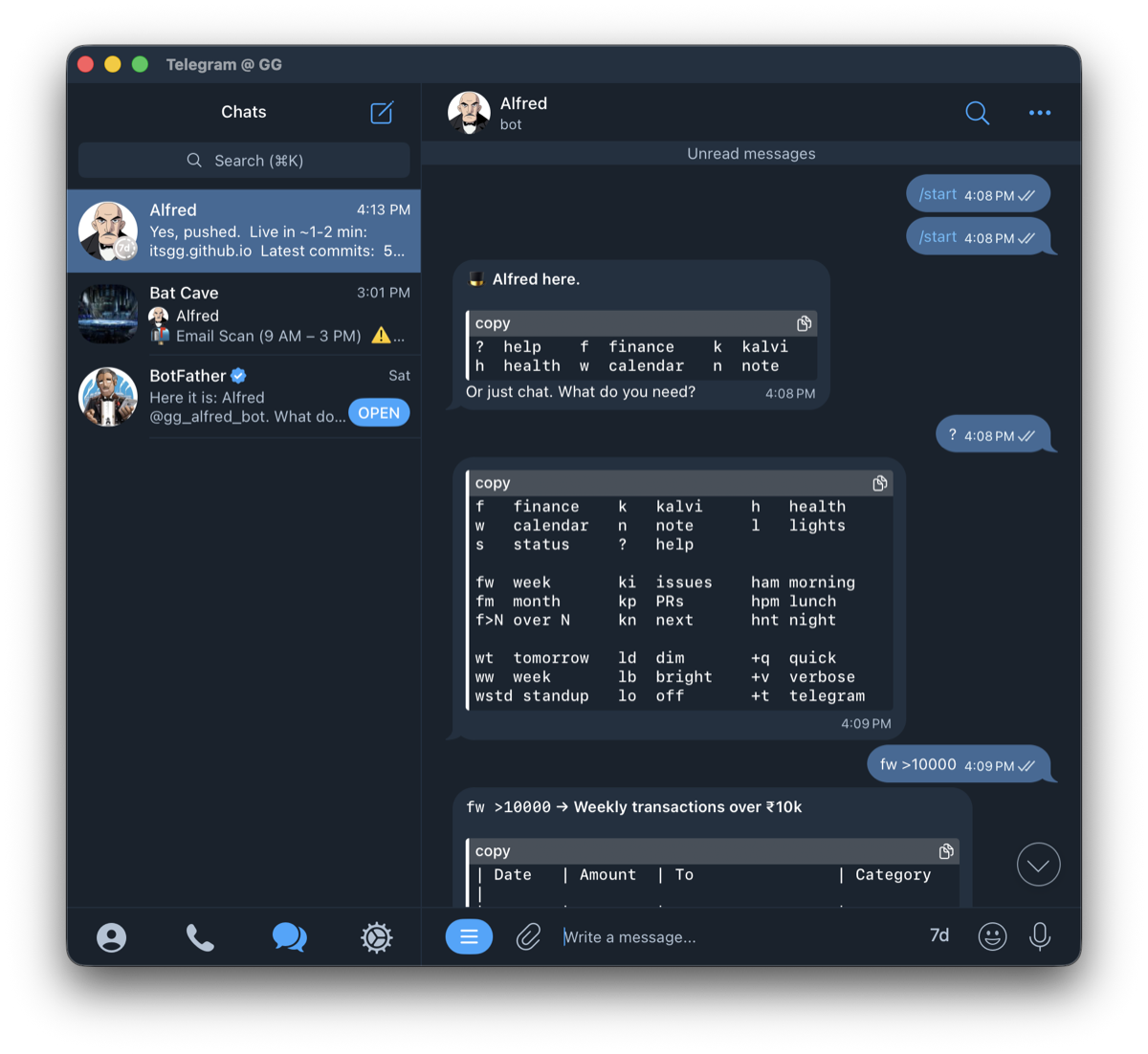
The flow: /start shows a quick intro, ? displays the command reference, and fw >10000 filters weekly transactions over ₹10k. Three characters instead of “show me all transactions from this week that are over ten thousand rupees.”
The Command Structure
Text Mode: Spectrum of Brevity
All these do the same thing:
f                    # 1 character (power user)
fin                  # 3 characters (balance)
finance              # full word (clarity)
The rule: shortest unambiguous prefix wins.
For actions, same pattern:
fw                   # ultra-short
fin.week             # medium
finance.weekly       # full (good for scripts)
Voice Mode: Full Words
For voice, I use complete words for recognition accuracy:
"Alfred finance"
"Alfred finance weekly"
"Alfred kalvi status"
The wake word “Alfred” (3 syllables) plus the command gives enough phonetic information for reliable recognition.
Domain Registry
I organized commands by life domain:
| Short | Medium | Full | What |
|---|---|---|---|
f |
fin |
finance |
Money tracking |
k |
kal |
kalvi |
Side project |
h |
hlt |
health |
Supplements, gym |
w |
wrk |
work |
Calendar, meetings |
n |
note |
note |
Quick capture |
l |
lit |
lights |
Smart home |
s |
sys |
system |
Meta commands |
Commands by Domain
Finance
| Text | Voice | What |
|---|---|---|
f |
“Alfred finance” | Today’s spending |
fw |
“Alfred finance weekly” | Week summary |
fm |
“Alfred finance monthly” | Month summary |
f >5000 |
“Alfred finance over 5000” | Large transactions |
f @7d |
“Alfred finance last 7 days” | Recent activity |
Projects (Kalvi)
| Text | Voice | What |
|---|---|---|
k |
“Alfred kalvi status” | Project overview |
ki |
“Alfred kalvi issues” | Open issues |
kp |
“Alfred kalvi PRs” | Pull requests |
kn |
“Alfred kalvi next” | What to work on |
Health
| Text | Voice | What |
|---|---|---|
h |
“Alfred supplements” | Current stack (time-aware) |
ham |
“Alfred supplements morning” | Morning stack |
hpm |
“Alfred supplements lunch” | Lunch stack |
hnt |
“Alfred supplements night” | Night stack |
Work
| Text | Voice | What |
|---|---|---|
w |
“Alfred calendar” | Today’s schedule |
wt |
“Alfred calendar tomorrow” | Tomorrow |
ww |
“Alfred calendar week” | This week |
wstd |
“Alfred standup” | Standup prep |
Notes
| Text | Voice | What |
|---|---|---|
n <text> |
“Alfred note [text]” | Quick capture |
ni <text> |
“Alfred idea [text]” | Idea capture |
nt <text> |
“Alfred todo [text]” | Task capture |
Home
| Text | Voice | What |
|---|---|---|
ld |
“Alfred lights dim” | Warm/dim |
lb |
“Alfred lights bright” | Full brightness |
ln |
“Alfred lights night” | Night mode |
lo |
“Alfred lights off” | Off |
System
| Text | Voice | What |
|---|---|---|
? |
“Alfred help” | List commands |
s |
“Alfred status” | System status |
Modifiers
Commands can be modified:
Output Modifiers
| Text | Voice | Effect |
|---|---|---|
+q |
“quick” | Brief output |
+v |
“detailed” | Verbose output |
+t |
“send telegram” | Route to Telegram |
Filters
| Text | Voice | Effect |
|---|---|---|
>N |
“over N” | Greater than |
<N |
“under N” | Less than |
@Nd |
“last N days” | Time filter |
Examples
fw +q +t              # Quick weekly finance to Telegram
ki +v                 # Detailed issue breakdown
f >10000 @30d         # Large transactions this month
Context Awareness
The assistant knows context:
Time-based:
hat 7am → morning supplementshat 1pm → lunch supplementshat 8pm → evening supplements
Conversation-based:
- After
k, “issues” →ki(no need to repeat “kalvi”) - After
f, “weekly” →fw(no need to repeat “finance”)
Voice Confirmation
For voice commands, I built in a confirmation step:
Me: "Alfred finance weekly send telegram"
Alfred: "Weekly finance to Telegram. Go?"
Me: "Go"
Confirmations: “yes”, “go”, “confirmed” Cancellations: “cancel”, “never mind”
Evolving the Language
The spec isn’t frozen. It evolves from actual usage:
-
Alfred suggests shortcuts — When I type something verbose like “check my spending this week”, Alfred responds with the answer plus a nudge: “Shortcut:
fw” -
New patterns get added — If I find myself repeating a query that has no shortcut, we add one.
-
Unused commands get dropped — If a command never gets used after a month, it’s cruft. Remove it.
-
Voice and text co-evolve — The same feedback loop works for voice: “Alfred, what’s on my calendar tomorrow?” gets the suggestion “Voice shortcut: ‘Alfred calendar tomorrow’”
This way the language grows from real behavior, not theoretical completeness. Start minimal, expand only when friction demands it.
What I Learned
Single-letter commands stick. After a week, f and k became muscle memory. I rarely type the full words anymore.
Voice needs more syllables. “Alfred finance” works reliably. “Alfred fin” gets misheard as “Alfred thin” or “Alfred fine.”
Context reduces friction. Not having to repeat the domain after the first command feels natural, like continuing a sentence.
The spectrum helps learning. I started with full words (finance.weekly), graduated to medium (fin.week), now use ultra-short (fw). Having all three available meant no memorization pressure.
Applying This to Coding Agents
The same command design works well for coding-agent operations in chat.
A practical mapping:
c      -> codex
cl     -> claude
g      -> gemini
Core control verbs:
st     -> status
x      -> cancel
r      -> reset
n      -> next
Common modifiers:
+q     -> quick output
+v     -> detailed output
+a     -> async / queue
+s     -> sync / wait
!      -> elevated/unsafe execution mode (per command)
Example flow:
c do: fix flaky test +s
cl review: latest diff +q
g n +v
Response format used across these commands:
Sent -> Result -> State -> Next
The principle is unchanged: shortest unambiguous shorthand for text, longer explicit phrases for voice.
The Help Command
Typing ? shows available commands:
> ?

FINANCE: f fw fm f>N f@Nd
KALVI:   k ki kp kn
HEALTH:  h ham hpm hnt
WORK:    w wt ww wstd
NOTES:   n ni nt
LIGHTS:  ld lb ln lo
SYSTEM:  ? s

Modifiers: +q +v +t | Filters: >N <N @Nd
Try It
If you have an AI assistant you talk to regularly, try designing a shorthand:
- List your 5 most common queries
- Assign single-letter domains
- Add 2-3 actions per domain
- Test for a week, drop what doesn’t stick
The goal isn’t to build a programming language. It’s to reduce friction on the things you do every day.
References
- Command Line Interface Guidelines — Principles for CLI design
- Wake Word Detection Guide — Phonetic design for voice
- SNS-Core — Shorthand notation for AI-to-AI communication