Personal command language for AI
Contents 19 sections
By early 2026 I was talking to my AI assistant dozens of times a day, and a lot of it was the same few requests. After months of typing them out in full sentences, I gave them a shorthand, closer to the way you’d text a close friend who already knows your context than to a programming language.
Note
September 2026. Alfred, the assistant in the screenshots, was the OpenClaw system described in Personal OS with an AI agent and has since been replaced; my agent now is Arivu. The command table below died with it. The design rule did not: the shortest unambiguous prefix for typing, full words for voice, and a language that grows from what you actually repeat.
The problem with natural language
Natural language is great for complex requests. But for repeated queries, it’s wasteful:
"Hey, can you check my spending for this week and give me a quick summary?"
I ask some version of this daily. That’s a lot of keystrokes for something routine.
Two modes, different constraints
I wanted a system that works for both typing and voice. But these have opposite requirements:
| Mode | Optimal | Why |
|---|---|---|
| Typing | Shorter | Fewer keystrokes |
| Voice | Longer | More phonemes = better recognition |
Picovoice’s wake-word guide recommends two to four syllables. But for typing, single characters are ideal.
So I built a dual-mode system.
In action
Here’s what it looks like in practice, a Telegram conversation with my AI assistant Alfred:
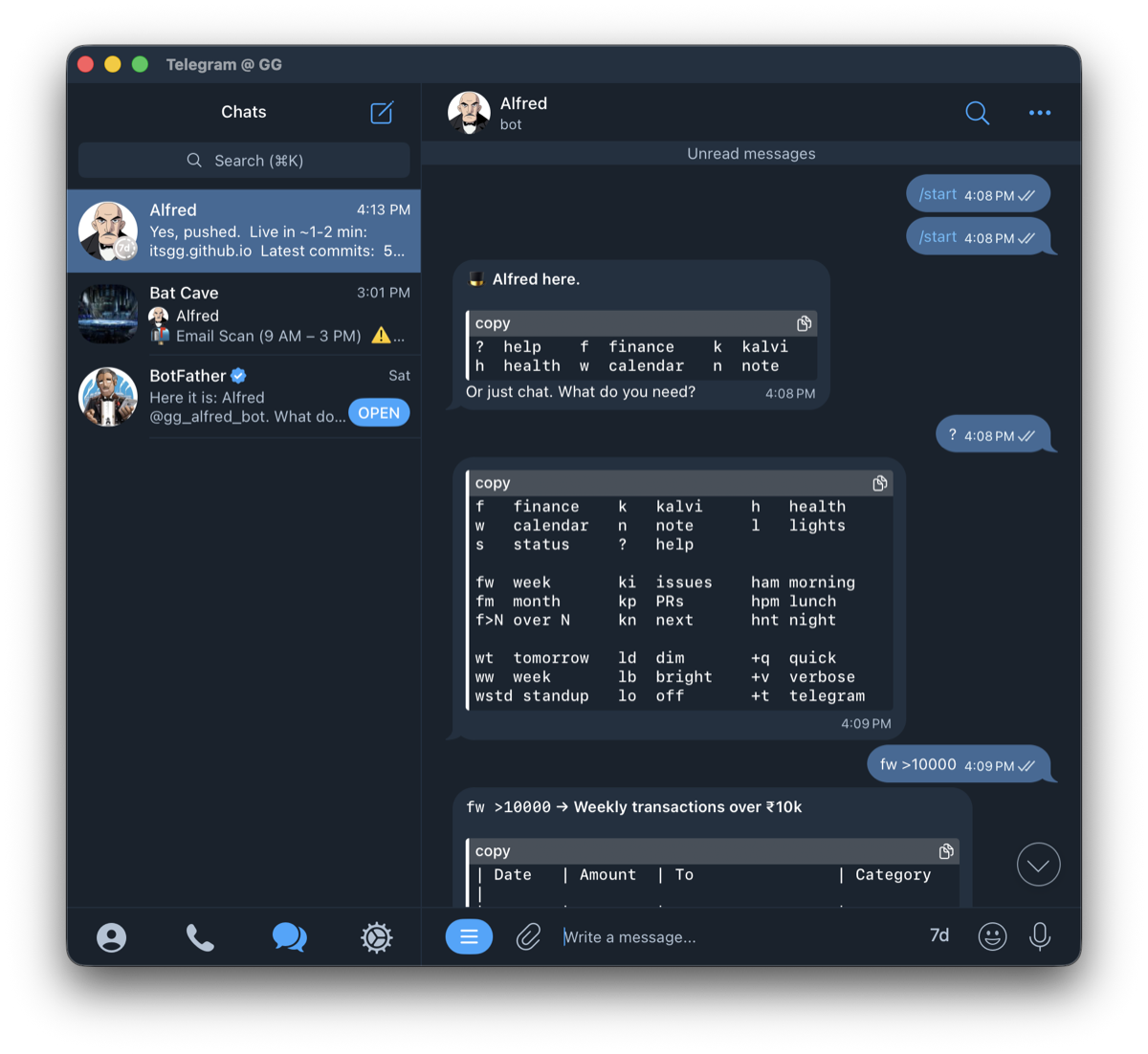
The flow: /start shows a quick intro, ? displays the command reference, and fw >10000 filters weekly transactions over ₹10k. Nine characters instead of “show me all transactions from this week that are over ten thousand rupees.”
The command structure
Text mode: spectrum of brevity
All these do the same thing:
f                    # 1 character (power user)
fin                  # 3 characters (balance)
finance              # full word (clarity)
The rule: shortest unambiguous prefix wins.
For actions, same pattern:
fw                   # ultra-short
fin.week             # medium
finance.weekly       # full (good for scripts)
Voice mode: full words
For voice, I use complete words for recognition accuracy:
"Alfred finance"
"Alfred finance weekly"
"Alfred kalvi status"
The wake word “Alfred” (two syllables) plus the command gives enough phonetic information for reliable recognition.
Domain registry
I organized commands by life domain:
| Short | Medium | Full | What |
|---|---|---|---|
f |
fin |
finance |
Money tracking |
k |
kal |
kalvi |
Side project |
h |
hlt |
health |
Supplements, gym |
w |
wrk |
work |
Calendar, meetings |
n |
note |
note |
Quick capture |
l |
lit |
lights |
Smart home |
s |
sys |
system |
Meta commands |
Commands by domain
Each domain follows the same text-vs-voice pattern. Finance is representative:
| Text | Voice | What |
|---|---|---|
f |
“Alfred finance” | Today’s spending |
fw |
“Alfred finance weekly” | Week summary |
fm |
“Alfred finance monthly” | Month summary |
f >5000 |
“Alfred finance over 5000” | Large transactions |
f @7d |
“Alfred finance last 7 days” | Recent activity |
The other domains map the same way: k for the Kalvi project (ki issues, kp PRs, kn next), h for health and supplements, w for work and calendar, n for notes, l for lights, s for system. Same prefix logic, same voice expansion.
Modifiers
Commands can be modified:
Output modifiers
| Text | Voice | Effect |
|---|---|---|
+q |
“quick” | Brief output |
+v |
“detailed” | Verbose output |
+t |
“send telegram” | Route to Telegram |
Filters
| Text | Voice | Effect |
|---|---|---|
>N |
“over N” | Greater than |
<N |
“under N” | Less than |
@Nd |
“last N days” | Time filter |
Examples
fw +q +t              # Quick weekly finance to Telegram
ki +v                 # Detailed issue breakdown
f >10000 @30d         # Large transactions this month
Context awareness
The assistant knows context:
Time-based:
hat 7am gives the morning supplementshat 1pm gives the lunch supplementshat 8pm gives the evening supplements
Conversation-based:
- After
k, “issues” meanski(no need to repeat “kalvi”) - After
f, “weekly” meansfw(no need to repeat “finance”)
Voice confirmation
For voice commands, I built in a confirmation step:
Me: "Alfred finance weekly send telegram"
Alfred: "Weekly finance to Telegram. Go?"
Me: "Go"
Confirmations: “yes”, “go”, “confirmed” Cancellations: “cancel”, “never mind”
Evolving the language
Alfred suggests shortcuts. When I type something verbose like “check my spending this week”, Alfred responds with the answer plus a nudge: “Shortcut: fw“. If I find myself repeating a query that has no shortcut, we add one. If a command never gets used after a month, it’s cruft, and it goes. Voice and text evolve through the same loop: “Alfred, what’s on my calendar tomorrow?” gets the suggestion “Voice shortcut: ‘Alfred calendar tomorrow’“.
What I learned
Single-letter commands stick. After a week, f and k became muscle memory. I rarely type the full words anymore.
Voice needs more syllables. “Alfred finance” works reliably. “Alfred fin” gets misheard as “Alfred thin” or “Alfred fine.”
Context reduces friction. Not having to repeat the domain after the first command feels natural, like continuing a sentence.
The spectrum helps learning. I started with full words (finance.weekly), graduated to medium (fin.week), now use ultra-short (fw). Having all three available meant no memorization pressure.
The help command
Typing ? shows available commands:
> ?

FINANCE: f fw fm f>N f@Nd
KALVI:   k ki kp kn
HEALTH:  h ham hpm hnt
WORK:    w wt ww wstd
NOTES:   n ni nt
LIGHTS:  ld lb ln lo
SYSTEM:  ? s

Modifiers: +q +v +t | Filters: >N <N @Nd
Try it
If you have an AI assistant you talk to regularly, try designing a shorthand:
- List your 5 most common queries
- Assign single-letter domains
- Add 2-3 actions per domain
- Test for a week, drop what doesn’t stick
The point is less friction on the things you do every day. Keep the shortcuts you reach for without thinking, and drop the rest.
References
- Command Line Interface Guidelines: principles for CLI design
- Wake Word Detection Guide: phonetic design for voice
- SNS-Core: shorthand notation for AI-to-AI communication
- Notation system for LLM prompts: the same idea for longer prompts
New writing by RSS, or on LinkedIn and X.