Personal OS with an AI agent
Contents 45 sections
- The core idea
- Architecture overview
- Step 1: give it a soul
- Step 2: the Telegram command center (“the bat cave”)
- Step 3: the daily rhythm
- Step 4: the weekly & monthly rhythm
- Step 5: finance automation
- Step 6: the heartbeat
- Step 7: the knowledge base
- Step 8: smart home integration
- Step 9: iPhone as input device
- Step 10: guardrails
- The stack
- What I learned
- Composability is the point
- Conclusion
I built an always-on AI agent that manages my health, finances, work, habits, smart home, and self-reflection, all through Telegram. No app-switching. No dashboards. Just a butler that knows my schedule, reads my email, dims my lights, and tells me when I’m falling into old patterns. This post is the architecture guide.
Note
September 2026. This is the system as it ran in early 2026: OpenClaw on a Mac Mini, a butler named Alfred, an Obsidian vault. It no longer runs: I have moved to my own personal agent, Arivu, which I am still building. The post stays as written because the daily rhythm, the routing rules and the guardrails are still where I would start.
Warning
If you build this on OpenClaw, keep it current and vet every skill. An agent with access to your shell, email and home is only as safe as the platform under it, and serious security problems in OpenClaw and its skills marketplace have come to light since this post went up. Run a current release, give each agent only the tools it needs (your own included), and install no skill until you have read it and everything it downloads or asks you to install. The guardrails below narrow what an agent can reach; on their own they do not make it safe.
The core idea
Most people use AI as a tool: open ChatGPT, ask a question, close the tab. That’s a screwdriver. I wanted an operating system.
A tool is something you invoke when you remember to. An OS runs continuously, proactively, and knows your context.
The system I built runs 24/7 on a Mac Mini. It wakes me up with a personalized morning briefing, reminds me to take supplements, scans my email, tracks my spending, nudges me to call friends, dims my bedroom lights at night, and writes weekly reviews of my life grounded in a personal development framework.
I didn’t build this from scratch. I used OpenClaw, an open-source AI agent runtime, as the backbone, and wired it together with Telegram, cron jobs, shell scripts, and a structured Obsidian vault.
Architecture overview
┌─────────────────────────────────────────────┐
│              OpenClaw Agent                 │
│                                             │
│  ┌─────────┐  ┌──────────┐  ┌───────────┐   │
│  │ SOUL.md │  │ TOOLS.md │  │ MEMORY.md │   │
│  │ persona │  │ routing  │  │ context   │   │
│  └─────────┘  └──────────┘  └───────────┘   │
│                                             │
│  ┌─────────────────────────────────────┐    │
│  │         Cron Scheduler              │    │
│  │  16 jobs: digests, reminders,       │    │
│  │  reviews, automations               │    │
│  └─────────────────────────────────────┘    │
│                                             │
│  ┌─────────────────────────────────────┐    │
│  │         Heartbeat Loop              │    │
│  │  File watchers, idle detection,     │    │
│  │  health checks                      │    │
│  └─────────────────────────────────────┘    │
│                                             │
├─────────────┬───────────┬───────────────────┤
│  Telegram   │  Gmail    │  Smart Home       │
│  (topics)   │  (gog)    │  (WiZ bulbs)      │
├─────────────┼───────────┼───────────────────┤
│  GitHub     │  Calendar │  Obsidian Vault   │
│  (gh CLI)   │  (gog)    │  (knowledge base) │
└─────────────┴───────────┴───────────────────┘
Step 1: give it a soul
The agent needs a personality and principles. Without this, it’s just another notification bot.
I created a SOUL.md file that defines:
# Who I Am
Alfred, a loyal butler with the sharpness of a bat
and the composure of a gentleman. 🎩

# Principles
- Be the digital gateway: filter noise, surface signal
- Respect attention: chunk tasks, gentle reminders, reduce friction
- Never disturb between 11PM and 5:30AM
- Be honest and open: no topic is off-limits

# Rules
- Never guilt-trip. Invitations, not accusations.
- "Never miss twice" is the only habit rule.
- Evening check-in: send once, don't follow up.
The persona shapes how the agent communicates. A supplement reminder from “Alfred” with a dry quip reads like a word from a butler; a generic push notification reads like an alarm clock.
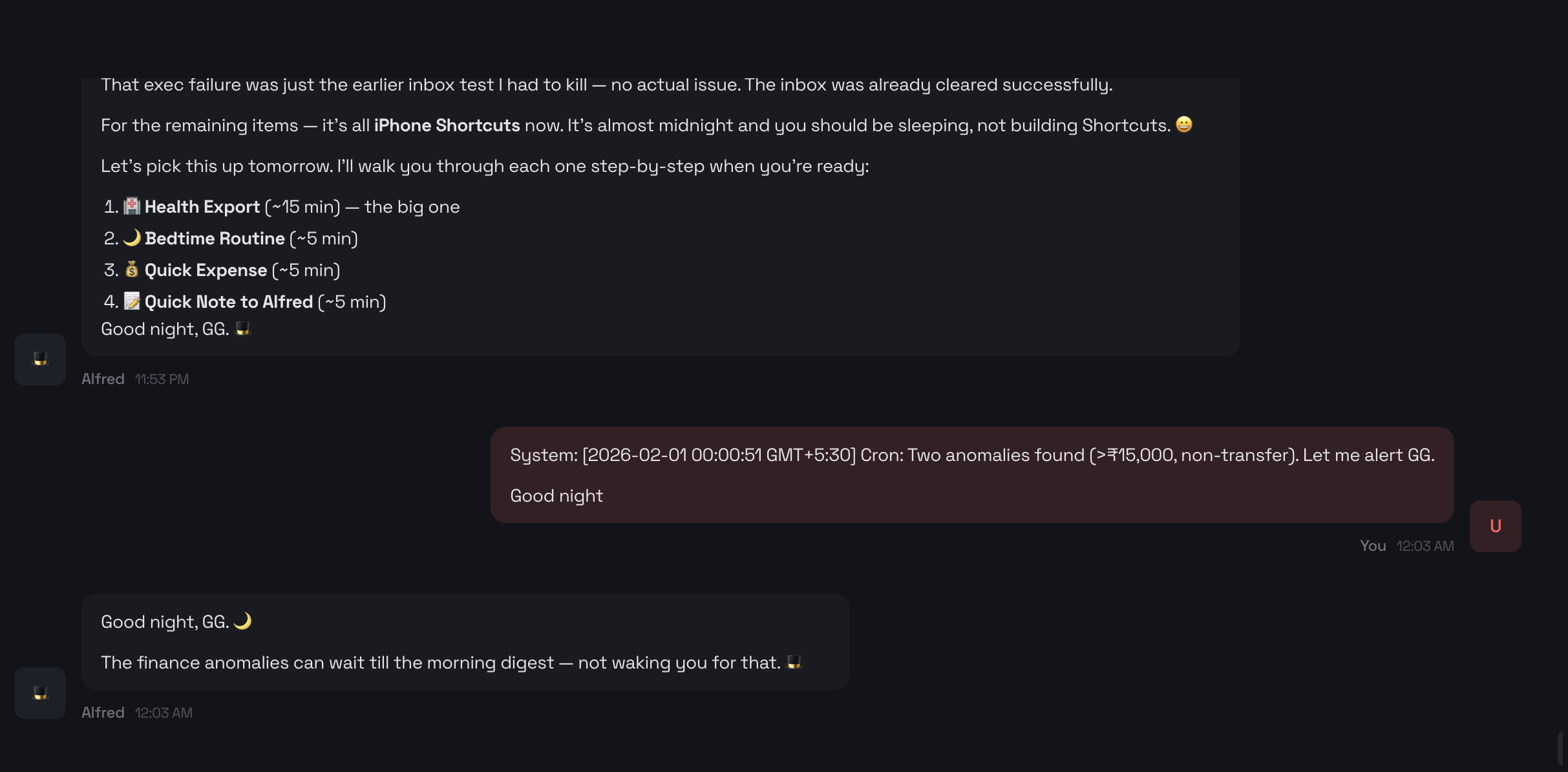
The soul in action: Alfred detects ₹15K+ finance anomalies at midnight, but SOUL.md says “never disturb between 11PM and 5:30AM.” So it defers to the morning digest, wishes me good night, and lets me sleep.
The SOUL also encodes behavioral protocols. For example, a habit-tracking protocol might log entries silently (date, time, trigger), no guilt, no streak counting. The agent asks “What was the cue?” and moves on. Triggers (stress, boredom, social, post-meal, craving, autopilot) can be defined in the protocol for whatever you’re tracking.
Step 2: the Telegram command center (“the bat cave”)
Instead of building a custom app, I use a single Telegram group as my dashboard. I call it The Bat Cave.
The concept is simple: one Telegram group with topics (Telegram’s threaded channel feature) acting as dedicated feeds. A Telegram bot named Alfred, the butler persona, posts everything. In the group it is a private news wire and life dashboard more than a chatbot.
Alfred the bot is the face of the system. When I DM Alfred directly, I’m talking to the OpenClaw agent conversationally: asking questions, giving instructions, chatting. But in the Bat Cave group, Alfred is autonomous: posting digests, reminders, and reviews on schedule without any prompting.
The topics are:
| Topic | Purpose |
|---|---|
| Daily | Morning digest, reviews, check-ins |
| Work | Standup, GitHub activity, PR alerts |
| Health | Supplements, workouts, wind-down |
| Finance | Spend alerts, anomalies, budgets |
| Inbox | Email summaries, catch-all |
| System | Backups, cron failures, health checks |
Each topic is a dedicated feed. The agent has strict routing rules defined in a TOOLS.md file: supplement reminders always go to Health, finance anomalies to Finance, backup reports to System. Nothing crosses wires. I can mute topics I don’t need right now without losing anything.
Why a Telegram bot?
I considered several approaches:
- A custom web app: too much to build and maintain. I’d spend more time on the dashboard than on my actual life.
- Discord: good for communities, overkill for a personal system, and slower on mobile.
- Slack: great, but it felt like bringing work home.
- SMS or WhatsApp: no topics, no formatting, no bot API worth using.
Telegram hits the sweet spot:
- Topics give me threaded channels in a single group
- The Bot API is powerful and well-documented
- Markdown support means formatted, readable messages
- It runs on phone, tablet, desktop and web
- Silent messages let the bot post without buzzing my phone
- It costs nothing on the Telegram side
Creating the bot takes 2 minutes via BotFather. Connect it to OpenClaw, create a group, enable topics, and you have a personal command center.
The DM channel with Alfred is for conversational back-and-forth: asking questions, giving instructions, or just chatting. The Bat Cave group is the autonomous feed.
Step 3: the daily rhythm
Here’s what a typical day looks like, entirely automated:
5:30 AM: morning digest
An isolated sub-agent wakes up and compiles:
- Weather for my city
- Calendar across 3 Google accounts (personal, work, side project)
- Curated news: AI/LLM, startups, fitness, engineering, filtered to one sentence per category, with links
- Yesterday’s spending, pulled from a CSV ledger
- A daily insight: one thought connecting news to my current projects
- Breakfast supplements: the full stack with dosages
This lands in the Daily topic before I wake up.
5:45 AM: supplement reminder
A dedicated ping in the Health topic: “Take these before gym.” Separate from the digest because I need it visible while I’m moving around the kitchen, not buried in a wall of news.
9:00 AM: email scan
The agent scans all three Gmail accounts using a CLI tool, filters out newsletters/promotions/automated notifications, and only pings me if something needs attention (a human reply, a bill, a meeting invite).
9:30 AM: daily standup (weekdays)
Pulls yesterday’s GitHub activity, today’s calendar, and open PRs. Posts a clean standup to the Work topic. My team doesn’t need this; I need this. It’s my morning context load.
1:30 PM: lunch supplements
Quick ping. Three supplements, three lines.
3:00 PM: afternoon email scan
Same filter, last 6 hours.
6:00 PM: evening workout nudge (Tue/Thu/Sat)
One line: “Boxing at 6:30. Go.” No essay.
6:30 PM: daily backup
Backs up the agent workspace and personal scripts to private GitHub repos. Reports status to System topic.
8:30 PM: dinner supplements
Seven supplements. Listed clean.
10:30 PM: wind-down
This is my favorite automation. The agent:
- Dims the bedroom smart bulb to warm mode via a Python script controlling WiZ bulbs
- Sends 3 reflection prompts: “Today I felt [blank] because [blank]”, “The story I told myself was [blank]”, “Today mattered because [blank]”
- Notes that lights will dim further at 10:45
10:45 PM: night mode
Silently dims lights to minimum. No notification. Just darkness.
Step 4: the weekly & monthly rhythm
Wednesday 6 PM: social check-in
“Who haven’t you talked to in a while?” That’s it. A nudge, not a lecture.
Friday 8 PM: smart patterns
This is the powerful one. The agent reads my journal entries, spending data, and GitHub commits for the week, then analyzes patterns through the lens of a personal development framework:
- Is a cycle of build, sabotage, guilt and avoidance starting?
- Sleep trending down? (Flag as emotional signal, not just health metric)
- Side project commits: steady or binge-crash?
- Spending spikes?
- Which habits got missed twice? (The only rule that matters)
Output: 3-5 brief, actionable insights. No filler.
Sunday 6:30 PM: weekly review
Structured as Being, Doing, Having:
- Being: Mind (meditation, screen time), Emotion (journal entries, rumination), Meaning (side project consistency)
- Doing: Relationships (quality time), Work (commits, PRs), Civic (contribution beyond self)
- Having: Body (gym, sleep), Finances (spend vs budget, anomalies)
Ends with 3 wins, 3 focus areas, and 1 pattern noticed.
1st of month: monthly review
Same framework, zoomed out. Tracks progress against 3-month targets for each life domain. Includes a prompt: “What would the book say about this month?”
Step 5: finance automation
Every 6 hours, an isolated sub-agent runs a finance ingestion pipeline:
- Parses bank email alerts, extracting transaction data from notification emails
- Processes credit card statements: PDF parsing with categorization
- Auto-categorizes, matching merchants to spending categories
- Detects anomalies, flagging any single transaction over a threshold in non-transfer categories
If something’s unusual, it alerts me in the Finance topic. If everything’s clean, silence.
The data flows into a CSV ledger in an Obsidian vault, which means I can view spending dashboards alongside my journal entries.
Step 6: the heartbeat
The cron scheduler handles time-based events. The heartbeat handles everything else.
Every few minutes, the agent checks:
- Inbox file: a text file in iCloud Drive. Drop anything in it from any device (iPhone Shortcut, Mac script), and the agent processes it on the next heartbeat.
- Habit log file: same pattern. An iPhone Shortcut lets you tap a category and pick a trigger, and it writes to an iCloud file. The agent picks it up, appends to the CSV log, and clears the file. No Telegram message. Silent bookkeeping.
- Idle time: if I’ve been quiet for 4+ hours during waking hours, a gentle check-in.
- Cron health: if any scheduled job failed, alert immediately.
- Sub-agent results: if a background task finished, summarize the result.
Between them, cron answers to the clock and the heartbeat answers to whatever changed.
Step 7: the knowledge base
All of this is grounded in an Obsidian vault structured as:
00-inbox/         : Quick capture
01-journal/       : Daily notes
02-zettelkasten/  : Evergreen ideas
03-projects/      : Active projects with index.md
04-domains/       : Life domains (finances, body, work...)
05-reading/       : Book notes
06-writing/       : Blog drafts
07-resources/     : Scripts, templates, configs
08-archive/       : Done projects
The agent reads from this vault constantly: journal entries for pattern detection, transaction data for finance reports, domain index pages for review targets.
The vault is the agent’s long-term memory. The workspace files (SOUL.md, TOOLS.md, HEARTBEAT.md) are its operating instructions.
Step 8: smart home integration
Simple but effective. A Python script controls WiZ smart bulbs:
# Warm mode at 10:30 PM
python3 wiz-bulb.py warm

# Night mode at 10:45 PM
python3 wiz-bulb.py night
The agent runs these as cron-triggered shell commands. No separate smart home hub needed. The LLM is the hub.
Step 9: iPhone as input device
Apple Shortcuts close the loop. Instead of opening Telegram to tell the agent something, I use Shortcuts for structured input:
- “Quick log”: tap, pick a category and trigger, and it writes to an iCloud file that the agent processes on the next heartbeat
- “Quick Inbox”: dictate or type, and it writes to inbox.txt for the agent to process
The Shortcut writes to iCloud Drive. The agent reads from iCloud Drive. No API needed. File system as message bus.
Step 10: guardrails
An always-on AI agent with shell access, email access, and smart home control is powerful. It’s also dangerous if left unchecked. Here’s how I lock it down.
Access control
The basics: DM pairing so unknown senders must be approved before the bot responds, group allowlists, and require-mention in groups so it never eavesdrops on ambient chat. The gateway WebSocket requires a token, host-level shell commands are gated by an allowFrom list (only my Telegram ID), and remote code execution on paired devices can be set to deny.
Tool restrictions
Each agent gets its own allow/deny list: a public-facing agent might only get read, my personal agent gets everything. Tool execution can run in Docker containers to isolate it from the host, and workspace access is set per agent (none, read-only, or read-write). A reader agent summarizing untrusted web content doesn’t need write access.
Token and spending control
A few knobs keep token usage in check: maxTokens and contextWindow per model, a model allowlist (agents.defaults.models) so the agent can only switch to models you configured, cheaper models for less trusted agents, turning off extended thinking (/reasoning off), and compaction to summarize history before it grows unbounded.
The real cost guardrail is a separate spend limit per agent. With Anthropic that means one workspace per agent, each with its own key (wired up in auth-profiles.json) and its own monthly limit, sized from what that agent actually uses:
- Personal agent: its own workspace, the highest limit
- Public agent: its own workspace, a low limit
- Sub-agents: their own workspace, sized for the scheduled jobs, which cost the most
OpenClaw has no built-in dollar budget, but the provider’s workspace limits do the job: one workspace per agent means one spending ceiling per agent.
Network and the quick audit
The gateway binds to localhost only, mDNS discovery is set to minimal, log tool output is redacted (redactSensitive: "tools"), and file permissions are locked (700 on the state directory, 600 on config). OpenClaw’s built-in audit handles most of this:
openclaw security audit        # check for issues
openclaw security audit --deep # live probe
openclaw security audit --fix  # auto-fix common footguns
--fix tightens open group policies, re-enables log redaction, and locks file permissions. I run it after any config change.
My baseline config
{
  gateway: {
    bind: "loopback",
    auth: { mode: "token", token: "<generated>" }
  },
  channels: {
    telegram: {
      dmPolicy: "pairing",
      groups: { "*": { requireMention: true } }
    }
  },
  tools: {
    elevated: { allowFrom: ["<my-telegram-id>"] }
  },
  logging: { redactSensitive: "tools" },
  discovery: { mdns: { mode: "minimal" } }
}
The principle: start locked down, widen deliberately. The agent earns access the same way a new employee does. Prove competence in a sandbox before getting production credentials.
The stack
| Component | Tool |
|---|---|
| Agent runtime | OpenClaw |
| LLM | Claude (Anthropic) |
| Interface | Telegram (topics group + DM) |
| Scheduling | OpenClaw cron (16 jobs) |
| gog CLI (Google Workspace) | |
| Calendar | gog CLI |
| Code activity | GitHub CLI (gh) |
| Finance | Custom Python scripts (ingest, categorize, anomaly detect) |
| Smart home | Python + pywizlight |
| Knowledge base | Obsidian vault (local Markdown) |
| Mobile input | Apple Shortcuts writing to iCloud Drive |
| Backup | Shell script pushing to private GitHub repos |
| Hosting | Mac Mini (always-on) |
What I learned
1. Persona matters more than you think
“Take your supplements” from a generic bot gets ignored. I notice the same message from “Alfred” when it comes with a one-liner about my gym session.
2. Silence is golden
The email scanner only pings when something matters. The finance pipeline only alerts on anomalies. Silent logs stay silent. The best notifications are the ones that don’t fire.
3. The file system beats an API
Using iCloud Drive as a message bus between iPhone Shortcuts and the agent is stupidly simple and holds up well. No webhooks, no authentication, no rate limits. Just files.
4. Reviews beat reminders
The supplement pings are useful. The weekly pattern analysis is where the real value is. Seeing “your side project commits dropped after Wednesday, spending spiked on food delivery, and sleep declined: the loop is starting” is the kind of insight no app gives you.
5. The agent needs boundaries
“Never disturb between 11PM and 5:30AM” and “evening check-in: send once, don’t follow up” are critical. Without boundaries, helpful becomes annoying fast.
6. Low-friction design
Everything is chunked: one notification per concern, clear topics, scannable formatting. The morning digest is designed to be read in 30 seconds. Supplement reminders are just a list: no preamble. The agent respects that attention is a finite resource.
Cost
Running Claude as the backbone LLM costs roughly $2-5/day depending on how many isolated sub-agent tasks fire (reviews, email scans, finance ingestion). The morning digest is the most expensive single job since it searches the web, reads calendars, and composes a personalized briefing. The Mac Mini runs 24/7 anyway. Telegram is free. Obsidian is free. The only real cost is the LLM API.
Composability is the point
You don’t need all of these. The power is in composability:
- Each module is just a cron job (scheduled) or heartbeat check (event-driven)
- Input comes from files, email, CLI tools, or Shortcuts
- Output goes to Telegram topics, Obsidian notes, or silent logs
- The agent’s SOUL ensures consistent tone across all modules
- The knowledge base (Obsidian vault) gives every module shared context
Start with the module that solves your biggest daily friction. For me, it was the morning digest: I was spending 20 minutes every morning checking weather, calendar, news, and email across 6 apps. Now it’s one Telegram message.
The second module should be the one you keep forgetting. Supplements, bills, exercise, whatever falls off when life gets busy. That’s where an always-on agent earns its keep.
Conclusion
A personal OS is a system that knows your context, respects your attention, and runs quietly in the background, surfacing signal only when it matters. It does not have to automate everything to get there.
Getting started
You don’t need to replicate this entire system. Start with:
- Install the current OpenClaw release on a machine that stays on (see the warning at the top)
- Create SOUL.md: give it a name, a personality, and 3 principles
- Connect Telegram: one group with topics
- Add one cron job: a morning digest or daily reminder
- Add one heartbeat check: an inbox file that your phone can write to
Then grow it. Add finance tracking when you feel the pain of not knowing where money goes. Add reviews when you want to see patterns. Add smart home when you’re tired of opening an app to dim lights.
Resources:
- OpenClaw: Open-source AI agent runtime
- pywizlight: Python library for WiZ smart bulbs
- gog: Google Workspace CLI (Gmail, Calendar)
- GitHub CLI:
ghfor code activity - Personal command language for AI: the shorthand I used to talk to Alfred
New writing by RSS, or on LinkedIn and X.